Experience the power of professional 3D slicing software that's completely free. Trusted by millions worldwide.
Optimized slicing engine for quick results
Fine-tune every print parameter
All features, no hidden costs
Cura Slicer is an innovative, free 3D printing preparation software that seamlessly converts your digital 3D models into print-ready instructions. Whether you're a beginner taking your first steps in 3D printing or a seasoned professional pushing the boundaries of additive manufacturing, Cura Slicer delivers the tools and flexibility you need.
Built on open-source principles and developed by Ultimaker, Cura Slicer has become the industry standard for 3D printing preparation. With millions of users worldwide and an active community constantly improving the software, you're joining a global network of makers, engineers, educators, and innovators.
The software intelligently processes STL, OBJ, 3MF, and other common 3D file formats, transforming them into G-code that tells your printer exactly how to create your object layer by layer. But Cura Slicer goes beyond simple conversion – it provides sophisticated controls for optimizing print quality, reducing material usage, minimizing print time, and ensuring reliable results every single time you print.
What sets Cura Slicer apart is its perfect balance between simplicity and power. New users benefit from intelligent default settings that deliver great results immediately, while advanced users can dive deep into hundreds of parameters to achieve absolute perfection. The intuitive interface guides you through the entire workflow, from model import to final G-code export, making professional-quality 3D printing accessible to everyone.
Packed with professional features that make 3D printing easy and reliable
Works seamlessly with 400+ 3D printer models from every major manufacturer. Can't find your printer? Easily create custom profiles with our intuitive setup wizard.
Advanced algorithms optimize every aspect of your print, from layer adhesion to support placement, ensuring superior quality and minimal material waste.
Pre-configured profiles for all common filaments: PLA, ABS, PETG, TPU, Nylon, and more. Each material optimized for best results.
Inspect your print layer by layer before sending to the printer. See exactly how supports will be placed and identify potential issues early.
Hundreds of adjustable settings give you complete control. Adjust layer heights, infill patterns, speeds, temperatures, and more to perfection.
Available for Windows, macOS, and Linux. Work seamlessly across all your devices with cloud profile synchronization.
Cura Slicer isn't just software – it's a complete ecosystem designed to make your 3D printing journey smooth and successful. Every feature has been carefully crafted based on feedback from millions of users worldwide.
The software is completely free and open-source, meaning you get professional-grade capabilities without any licensing fees or subscription costs. Regular updates bring new features, improved printer support, and enhanced performance, all at no cost.
Our vibrant community provides an invaluable resource. Access thousands of optimized print profiles, troubleshooting tips, and creative solutions shared by experienced users. Whether you need help or want to showcase your latest print, the community is always there.
Start Your Free DownloadOur streamlined workflow gets you printing faster
Drag and drop your 3D model files directly into Cura. Supports all standard formats including STL, OBJ, 3MF, and AMF.
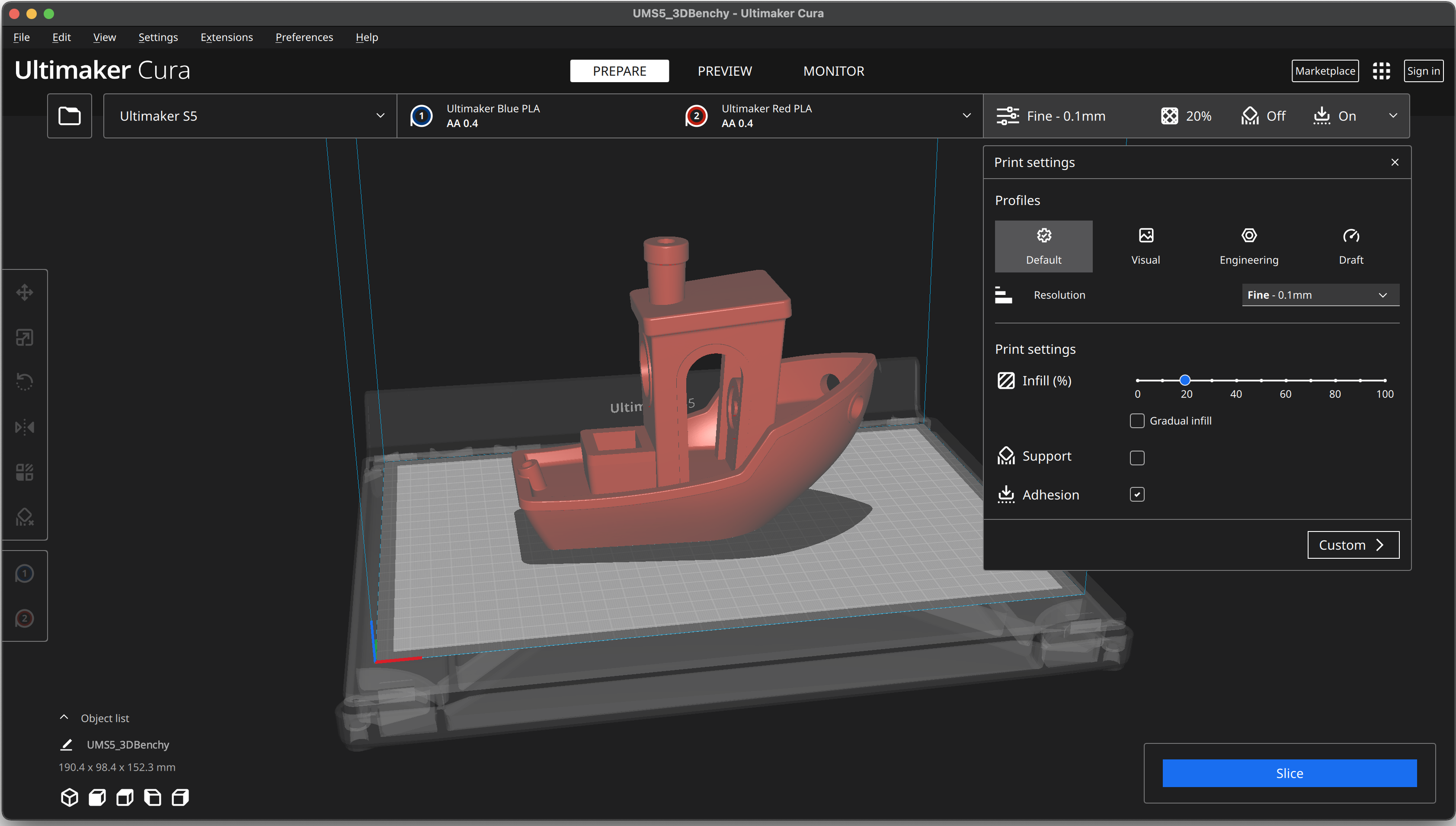
Select from recommended presets or customize every parameter. Adjust quality, speed, and strength to match your needs.
Use our advanced preview to inspect every layer. Check support placement, identify potential issues, and verify print time estimates.
Generate G-code and transfer to your printer via SD card, USB, or network connection. Start printing with confidence.
Cura Slicer's support generation system analyzes your model's geometry and creates efficient support structures exactly where needed. Choose from multiple patterns including traditional grid supports or innovative tree supports that use less material and are easier to remove. The software automatically calculates optimal support density and placement angles for maximum stability with minimal post-processing.
For printers with multiple extruders, Cura unlocks powerful multi-material capabilities. Print with multiple colors, combine flexible and rigid materials, or use soluble supports for complex geometries. The software intelligently manages extruder switching to minimize waste and optimize print time.
Maximize efficiency with adaptive layer heights. Cura automatically adjusts layer thickness based on model geometry – using thinner layers for detailed areas and thicker layers for flat surfaces. This intelligent approach reduces print time while maintaining excellent surface quality where it matters most.
Select from over a dozen scientifically-designed infill patterns. Each pattern offers unique benefits: gyroid for strength in all directions, cubic for efficient material use, lightning for ultra-fast prints, and many more. Adjust infill density to balance strength, weight, and material usage perfectly.
Create unlimited custom profiles for different use cases. Save your optimized settings for specific materials, quality levels, or printer configurations. Share profiles with colleagues or the community, and import profiles created by expert users.
Yes, absolutely! Cura Slicer is 100% free with no hidden costs, premium tiers, or subscription requirements. Every feature is available to all users at no charge, and it will always remain free.
Cura supports over 400 printer models from all major brands including Ultimaker, Prusa, Creality, Anycubic, Ender, and many others. If your specific model isn't pre-configured, you can easily set up a custom printer profile.
Yes! Cura's open-source license (LGPL) permits both personal and commercial use without restrictions. Many businesses and manufacturing facilities rely on Cura for their production workflows.
Cura is designed to be beginner-friendly. After installation, simply select your printer from the list, load a 3D model, and click "Slice." The recommended settings will give you excellent results right away. As you learn, you can gradually explore more advanced features.
Yes! Cura Slicer runs smoothly on macOS (including Apple Silicon M1/M2/M3 chips), Windows, and Linux. Your settings and profiles sync seamlessly across all platforms.